

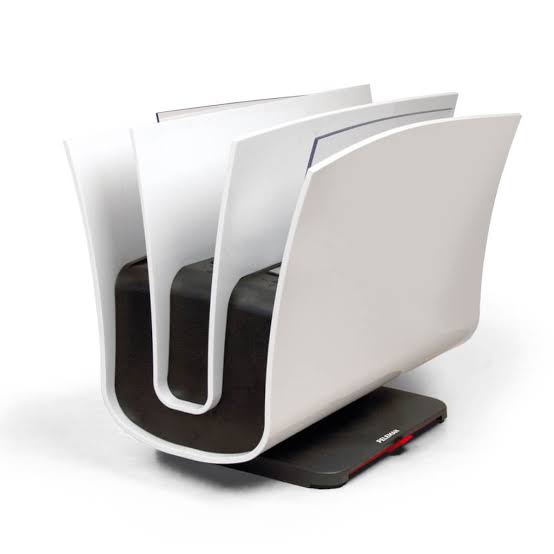
Thermal Binding Machine: The Ultimate Guide for Offices, Print Shops, and Professionals
What Is a Thermal Binding Machine?
A thermal binding machine is a document finishing device that fuses heat-activated adhesive in a pre-glued spine or binding cover to paper stacks, producing a clean, durable, booklike finish. Unlike comb or spiral binding, thermal binding offers a professional, seamless appearance ideal for reports, proposals, books, training manuals, and presentation materials.
How Thermal Binding Machines Work
Thermal binding machines use controlled heat to melt adhesive inside a binding spine or cover. Typical steps are:
-
Prepare the document by aligning pages and trimming if necessary.
-
Insert the document into a thermal binding cover or spine with pre-applied adhesive.
-
Place the cover into the machine's heating chamber for the recommended time.
-
Remove and allow cooling—often using a cooling clamp—for a strong, permanent bond.
Modern machines include adjustable timers, spine size compatibility, and cooling racks for faster production.
Top Benefits of Using a Thermal Binding Machine
-
Professional appearance: Seamless, hardcover-like finish ideal for client-facing materials.
-
Durability: Strong adhesive bond that resists page loss and wear.
-
Ease of use: Simple, repeatable process for high-volume jobs.
-
Variety of formats: Works with soft covers, hardcover spines, and a wide range of spine thicknesses.
-
Quiet operation: No noisy combs or punches—suitable for office environments.
Who Should Use a Thermal Binding Machine?
Thermal binding machines are useful for:
-
Businesses creating polished proposals, reports, and manuals.
-
Print shops and copy centers offering binding services.
-
Educational institutions producing course materials and theses.
-
Authors and self-publishers producing short-run softcover books.
Types of Thermal Binding Machines & Key Features to Compare
When selecting a thermal binding machine, consider these types and features:
-
Desktop vs. Production: Desktop models suit low-to-medium volume. Production models handle larger volume and thicker spines.
-
Spine compatibility: Check supported spine widths (e.g., 2mm–40mm) and cover types.
-
Heating method and time control: Adjustable timers and precise temperature control ensure consistent bonds.
-
Cooling mechanism: A cooling clamp or tray reduces warping and speeds workflow.
-
Batch mode and capacity: For higher throughput, look for models that allow stacking or sequential cycles.
Buying Guide: How to Choose the Best Thermal Binding Machine
Follow these steps to choose the right thermal binding machine for your needs:
-
Estimate volume: Calculate your daily and monthly binding needs—this determines whether a desktop or production unit is required.
-
Determine spine range: Match the machine to the spine sizes you use most often.
-
Assess build quality: Metal frames and long-life heating elements last longer under heavy use.
-
Consider consumables: Evaluate cost and availability of thermal covers and spines.
-
Check service and warranty: Choose vendors with accessible service and replacement parts.
For a curated selection of reliable models and consumables, visit our product collection: thermal binding machines.
Step-by-Step: How to Use a Thermal Binding Machine
Standard operating workflow:
-
Prepare: Neatly collate and square your pages. Trim if necessary to eliminate overhang.
-
Select cover: Choose a cover/spine sized to your page count.
-
Insert: Place the pages into the cover, ensuring even alignment.
-
Heat: Insert into the machine and select the correct heat/timer setting.
-
Cool: Remove after cycle and place in cooling clamp or tray for the recommended time.
-
Finish: Inspect the bind and trim edges if needed for a perfect finish.
Maintenance & Troubleshooting
Routine maintenance
-
Regularly clean heating elements and guide rails per manufacturer instructions.
-
Inspect power cords, vents, and fans to prevent overheating.
-
Replace worn cooling clamps and check alignment guides.
Common problems & fixes
-
Weak bond: Increase heat/time, ensure adhesive covers are fresh and stored properly.
-
Warping or bubbling: Use cooling clamps and avoid overfilling the spine.
-
Uneven binding: Ensure pages are square and centered before heating.
Thermal Binding vs. Other Binding Methods
|
Feature |
Thermal Binding |
Comb/Spiral Binding |
Perfect Binding |
|
Look |
Professional, booklike |
Practical, visible spiral/comb |
High-end book finish |
|
Durability |
Strong, permanent |
Durable but parts may catch |
Very durable, more complex setup |
|
Ease of use |
Simple; minimal training |
Very simple |
Requires specialized equipment |
|
Cost per unit |
Moderate (covers cost extra) |
Low per piece |
Higher for short runs |
Practical Use Cases and Examples
Examples where thermal binding shines:
-
Corporate annual reports and investor presentations—professional look with fast turnaround.
-
University theses and dissertations—neat, archival-quality binding for submission.
-
Training manuals and policy handbooks—durable, easy-to-store books for frequent use.
-
Small-run book printing—cost-effective for authors producing a few hundred copies.
Costs, Consumables, and ROI
Costs include the machine, thermal covers/spines, and power. Estimate ROI by comparing labor time saved and the premium you can charge for professionally bound documents. Buying in bulk for covers reduces per-unit cost significantly.
Recommended Features for Different Users
Home office or small business
-
Compact desktop unit, 2–12 mm spine range, simple timer, and cooling rack.
Medium office or small print shop
-
Higher capacity desktop or light production unit, wider spine compatibility (up to 40 mm), adjustable timers, and cooling clamp.
High-volume production
-
Production-grade machine with batch handling, fast cycle times, robust heating system, and service plan.
Frequently Asked Questions (FAQ)
Is thermal binding permanent?
Yes. Thermal binding creates a permanent adhesive bond between pages and the spine. While strong, the bond can be carefully removed by a professional if necessary.
What spine size do I need?
Spine size depends on page count and paper weight. Typical ranges: 2–6 mm (up to ~30 pages), 6–12 mm (50–200 pages), 12–40 mm (thicker manuals). Check the machine’s compatibility chart before purchasing.
How long does a thermal bind take?
Cycle times vary by machine and spine size—anywhere from 30 seconds to several minutes per bind plus cooling time. Production units and cooling clamps reduce overall throughput time.
Can I add or remove pages after binding?
Adding or removing pages requires breaking the adhesive bond and rebinding—thermal binding is intended as a permanent binding method and not designed for repeated edits.
Ready to Buy a Thermal Binding Machine?
If you're ready to upgrade your document finishing, explore a selection of dependable models and consumables at our store: thermal binding machines. Whether you need a compact desktop unit or a production system, choose a machine that matches your volume, spine needs, and budget.
© 2026 Peleman USA — Your Source for Thermal Binding Machines and Document Finishing Solutions.
Buy Unibind 60 Pro Binding Machine: Features, Benefits, and Pricing Guide
Thermal vs comb vs wire vs perfect binding